- Page d'accueil /
- Électronique /
- Computers, Laptops and Tablets /
- Computer Accessories /
- Docking Stations & Locks /
- AV Access KVM Switch Docking Station for MacB...
0 ratings

Numéro d'article:
215796381
AV Access KVM Switch Docking Station for MacBook, USB C KVM Switch 2 Monitors 2 Computers, 4K Dual HDMI Displays, 1 Laptop1 Desktop, Ethernet, 100W
Numéro d'article:
215796381
MUR 16240
Price Details
Excluding Shipping & Custom charges ( Shipping and custom charges will be calculated on checkout )
*All items will import from États-Unis
0 ratings
Écrire un commentaire
En stock
 Importé depuis la boutique USA
QTY:
Commandez maintenant et recevez votre commande aux alentours du Mercredi, Juin 24
Transaction sécurisée
Ubuy s'engage à protéger votre sécurité et votre confidentialité. Notre système avancé de sécurité des paiements garantit la confidentialité en chiffrant vos informations lors de la transmission grâce aux protocoles AES (Advanced Encryption Standards) et SSL (Secure Socket Layer). Vos coordonnées de paiement sont 100 % sécurisées car nous ne partageons pas vos informations de paiement avec des vendeurs tiers.
nos meilleurs partenaires logistiques


Effortlessly switch between systems using the top-mounted button or included wired remote.

Livraison
rapide

Retour
gratuit*

Emballage sécurisé

Produits 100 % originaux

Conformité PCI DSS

Certifié ISO 27001


Note: Step Down Voltage Transformer required for using electronics products of États-Unis store (110-120). Recommended power converters Acheter maintenant.


Ce qui se démarque
Dual Monitor Support
Easily connect two HDMI displays simultaneously for enhanced multitasking, making it an ideal solution for professionals needing improved workspace efficiency.
High Resolution
Supports 4K resolution for both monitors, delivering stunning visuals that elevate productivity and entertainment, providing crystal-clear clarity in presentations and media.
Power Delivery
Equipped with 100W power delivery, this docking station charges devices efficiently while in use, ensuring you stay connected without needing extra power adapters.
Détails du produit
| Compatibility | Laptop & Desktop |
| Maximum number of monitors | 2 |
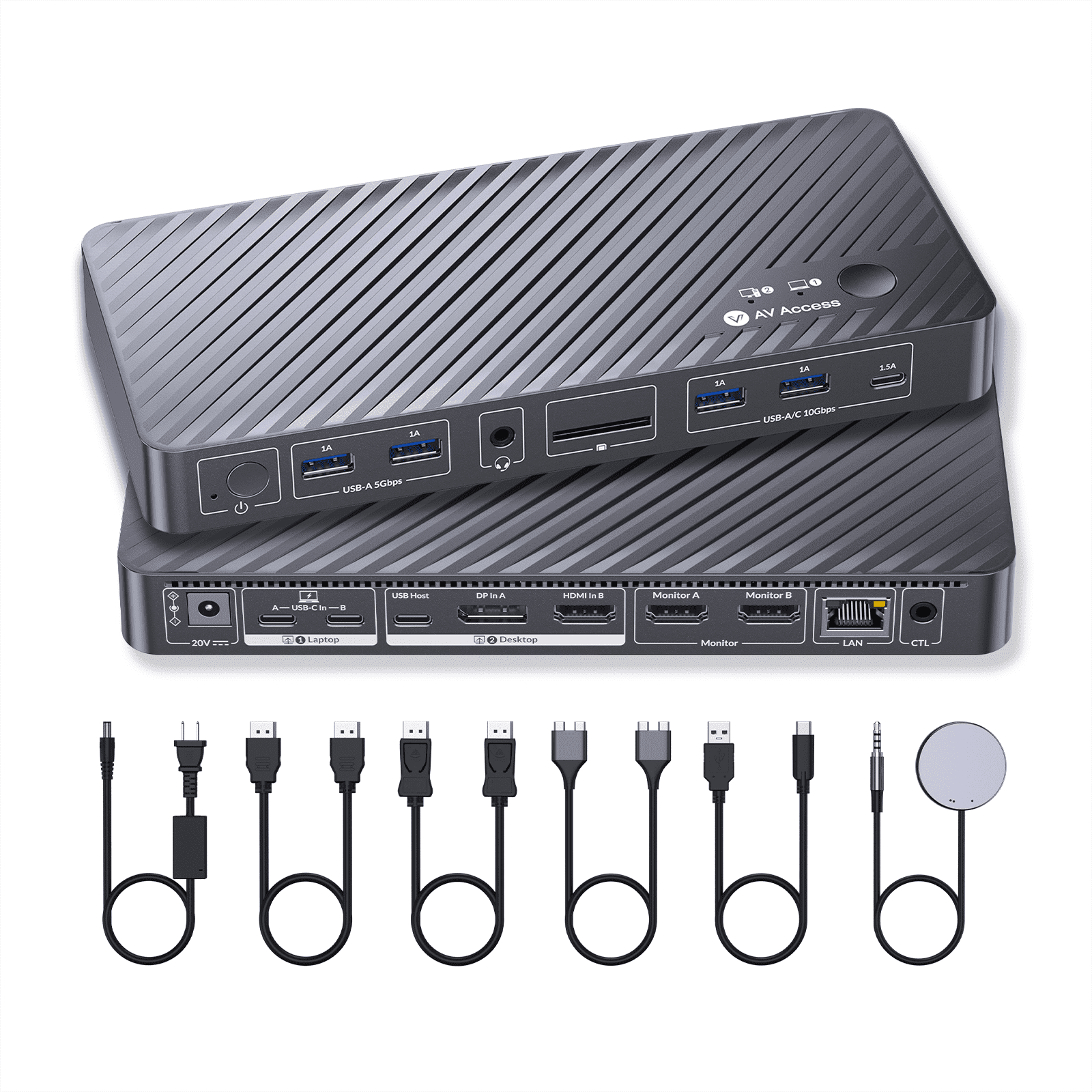
| Inputs/Outputs | 2 x HDMI video outputs, 2 x USB 3.2 Gen 2 (10Gbps) Type-A ports, 1 x USB 3.2 Gen 2 (10Gbps) Type-C port, 2 x USB 3.2 Gen 1 (5Gbps) Type-A ports, 1 x SD card slot, 1 x Gigabit Ethernet port, 1 x 3.5mm headset jack |
| Resolution | 4K@60Hz |
| Usb version | USB3.0 |
| In/Out type | HDMI |
| Input/output quantity | 1 |
| Brand | v-AV-Access |
| Accessories | 1 x KVM Dock Switcher 1 x Power Adapter (DC 20V/6A) 1 x HDMI 2.0 Cable (L = 1.5m) 1 x DP 1.2a Cable (L = 1.5m) 1 x Dual USB Type-C to Dual USB Type-C Cable (USB 3.2 Gen 2, L = 0.8m) 1 x USB Type-A to USB Type-C Cable (L = 1.8m) 1 x Wired Remote Controller (EXB01) 1 x User Manual |
| Model name | iDock-M10-US |
| Color | Grey |
| Dimensions | 3.99 x 8.66 x 0.99 in (10.1 x 22 x 2.5 cm) |
| Weight | 0.75 lb (340 grams) |
| Input/output direction | Output |
| Has nrtl listing certification | N |
À qui est-ce destiné ?

-
Multitasking Professionals
Ideal for users who switch between two computers and require dual 4K displays for enhanced productivity.
-
Creative Designers
Great for graphic designers needing high-resolution displays for design work while using a MacBook alongside a desktop.
-
Remote Workers
Perfect for remote workers wanting seamless connectivity between laptop and desktop with efficient power delivery and ethernet.

-
Casual Users
Not ideal for casual users who don’t need multiple screens or switch between devices frequently.
-
Gaming Enthusiasts
Not tailored for gamers looking for high-refresh-rate performance and lower latency connections.
-
Budget-Conscious Buyers
Might not suit users on a tight budget as it carries a premium price for advanced features.
DESCRIPTION DU PRODUIT
AV Access KVM Switch Docking Station for MacBook, USB C KVM Switch 2 Monitors 2 Computers, 4K Dual HDMI Displays, 1 Laptop1 Desktop, Ethernet, 100W Power Delivery, EDID EmulationiDock M10
Vous avez une question ? Chattez avec nous
Questions et réponses des clients
-
question:
Can I use this docking station with MacBook models that have M1 or M2 processors?
répondre: Yes, but only one external monitor is supported; connecting two will cause one display to go black. -
question:
Does this docking station require additional drivers or software?
répondre: No, it works seamlessly without the need for additional drivers or software. -
question:
How does the Ethernet functionality work when switching between systems?
répondre: Both systems remain online simultaneously without interruptions, even while switching control.
v AV Access Docking Stations & Locks Editorial Review
The AV Access KVM Switch Docking Station for MacBook is getting positive feedback from users who appreciate its functionality and design. This compact device allows seamless switching between two USB-C devices, facilitating the use of dual monitors, a keyboard, and a mouse with both a work laptop and a personal desktop. Users praise its ease of setup and the convenience it offers, especially for those working from home who need to switch between devices efficiently. Many customers noted the KVM switch's solid Construction and versatility as it doubles as a docking station with additional ports. There were mentions of some minor issues, such as difficulties with waking monitors from sleep mode and a desire for keyboard hotkey support, which some users feel would enhance usability. However, most found that the product met their expectations and performed its advertised functions well. It's also highlighted that the KVM switch effectively manages various computer setups, although users sometimes encounter challenges with compatibility across different monitors and necessary cables, which may require extra purchases. Despite these challenges, the overall sentiment leans towards satisfaction, especially for those who are tech-savvy and can navigate compatibility issues well. ###
Avis et évaluations clients
1 évaluations des clients
-
5 étoile
0%
-
4 étoile
100%
-
3 étoile
0%
-
2 étoile
0%
-
1 étoile
0%
Donnez votre avis sur ce produit
Partagez votre avis avec d'autres clients
Avantages
- Compact design with a small footprint
- Seamless switching between multiple devices
- Allows use of dual monitors, keyboard, and mouse for both computers
- Easy to set up, with all necessary cables included
- Solid build quality and Construction ###
Les inconvénients
- Lack of independent control over monitors
Historique des prix du produit
Informations importantes
- Limitations : Pour les produits expédiés à l'international, veuillez noter que toute garantie du fabricant peut ne pas être valide ; les options de service du fabricant peuvent ne pas être disponibles ; les manuels, instructions et avertissements de sécurité des produits peuvent ne pas être dans les langues du pays de destination ; les produits (et les matériaux qui les accompagnent) peuvent ne pas être conçus conformément aux normes, spécifications et exigences d'étiquetage du pays de destination ; et les produits peuvent ne pas être conformes à la tension et aux autres normes électriques du pays de destination (nécessitant l'utilisation d'un adaptateur ou d'un convertisseur le cas échéant). Il incombe au destinataire de s'assurer que le produit peut être importé légalement dans le pays de destination. En cas de commande auprès d'Ubuy ou de ses filiales, le destinataire est l'importateur officiel et doit se conformer à toutes les lois et réglementations du pays de destination.
- Tous les produits listés sur Ubuy ne sont pas à vendre, Ubuy étant un moteur de recherche mondial. Les produits sont soumis aux réglementations en matière d'exportation et de commerce.
MUR 16240
Commandez maintenant et recevez votre commande aux alentours du Mercredi, Juin 24
This item is not restrict in my country.(Please click on above link if this item is not restrict in your country, So our team will review and allow.)
QTY:
Transaction sécurisée
Ubuy s'engage à protéger votre sécurité et votre confidentialité. Notre système avancé de sécurité des paiements garantit la confidentialité en chiffrant vos informations lors de la transmission grâce aux protocoles AES (Advanced Encryption Standards) et SSL (Secure Socket Layer). Vos coordonnées de paiement sont 100 % sécurisées car nous ne partageons pas vos informations de paiement avec des vendeurs tiers.
nos meilleurs partenaires logistiques
Livraison transfrontalière la plus rapide
Caractéristiques et avantages
- Dual USB-C KVM switch docking station designed specifically for MacBooks.
- Supports dual 4K displays for seamless multitasking and minimal interruptions.
- 10-in-1 functionality includes multiple HDMI and USB ports along with Ethernet.
- Full speed 100W USB-C charging keeps your devices powered during use.
- Always-On Gigabit Ethernet ensures constant online access without dropouts.
- EDID management maintains consistent resolutions and display order for a stable experience.