- Page d'accueil /
- Produits de bureau /
- Électronique de bureau /
- Printers & Accessories /
- Computer Printers /
- Label Printers /
- Inateck Bluetooth Thermal Label Printer, Wire...
0 ratings

Numéro d'article:
110380250
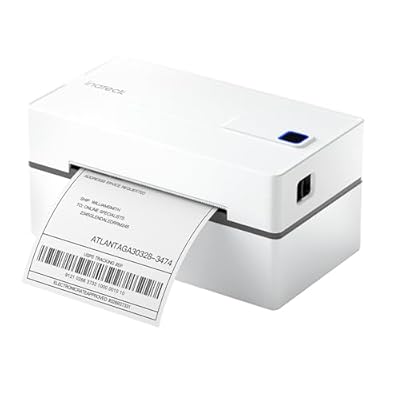
Inateck Bluetooth Thermal Label Printer, Wireless 4x6 Shipping Label Printer for Shipping Packages, Compatible with iPhone, Android, iPad, Windows,
Numéro d'article:
110380250
MUR 5020
Price Details
Excluding Shipping & Custom charges ( Shipping and custom charges will be calculated on checkout )
*All items will import from États-Unis
0 ratings
Écrire un commentaire
En stock
 Importé depuis la boutique USA
QTY:
Commandez maintenant et recevez votre commande aux alentours du Jeudi, Juin 25
Transaction sécurisée
Ubuy s'engage à protéger votre sécurité et votre confidentialité. Notre système avancé de sécurité des paiements garantit la confidentialité en chiffrant vos informations lors de la transmission grâce aux protocoles AES (Advanced Encryption Standards) et SSL (Secure Socket Layer). Vos coordonnées de paiement sont 100 % sécurisées car nous ne partageons pas vos informations de paiement avec des vendeurs tiers.
nos meilleurs partenaires logistiques


Easy Label Printing in 3 Steps: Connect, Design, and Print.

Livraison
rapide

Retour
gratuit*

Emballage sécurisé

Produits 100 % originaux

Conformité PCI DSS

Certifié ISO 27001


Note: Step Down Voltage Transformer required for using electronics products of États-Unis store (110-120). Recommended power converters Acheter maintenant.


Ce qui se démarque
Wireless Connectivity
Easily connect via Bluetooth to multiple devices, including iPhone, Android, Mac, and Windows, allowing you to print labels conveniently from anywhere without cumbersome cables.
Versatile Compatibility
Designed to work seamlessly with various platforms like Chrome and USPS, enabling users to print shipping labels effortlessly, enhancing efficiency for personal and business use.
High-Quality Printing
Produces clear, professional-grade 4x6 shipping labels quickly, ensuring your packages stand out while maximizing the quality and reliability of your shipping materials.
Détails du produit
| Item Weight | 2.2 lbs (1 kg) |
À qui est-ce destiné ?

-
Small Business Owners
Ideal for entrepreneurs needing to print shipping labels quickly and efficiently from various devices.
-
E-Commerce Sellers
Perfect for online sellers who frequently ship packages and require reliable, wireless label printing solutions.
-
Home Office Users
Great for remote workers and home offices that need an easy way to print shipping labels without bulk.

-
High Volume Shippers
May not handle extremely high volumes of printing as effectively compared to industrial printers.
-
Non-Bluetooth Devices
Users without Bluetooth connectivity may not be able to utilize the printer's wireless features.
-
Occasional Users
Individuals who rarely print shipping labels may find this specialized printer excessive for their needs.
DESCRIPTION DU PRODUIT
Inateck Bluetooth Thermal Label Printer, Wireless 4x6 Shipping Label Printer for Shipping Packages, Compatible with iPhone, Android, iPad, Windows, MacOS, Chrome, USPS
Vous avez une question ? Chattez avec nous
Questions et réponses des clients
-
question:
What is the printing speed of the Inateck Bluetooth Thermal Label Printer?
répondre: The Inateck Bluetooth Thermal Label Printer boasts a high-speed printing capability, capable of printing labels at approximately 72 labels per minute. This efficiency is particularly useful for businesses and individuals who handle large volumes of shipping and labeling tasks, allowing for quicker processing times. Whether you are running an online store or organizing a shipping operation, this printer can help streamline your workflow. -
question:
How do I connect my Inateck printer to my mobile device?
répondre: To connect your Inateck Bluetooth Thermal Label Printer to a mobile device, first, ensure Bluetooth is enabled on your iPhone, Android, or iPad. Then, download the corresponding app for your device. Open the app and follow the prompts to pair the printer. This wireless capability allows you to conveniently print labels directly from your device, ensuring a seamless experience for on-the-go printing needs. -
question:
Is the Inateck printer compatible with Windows laptops?
répondre: Yes, the Inateck Bluetooth Thermal Label Printer is fully compatible with Windows laptops. You can install the necessary drivers and use the printer with various applications commonly used for printing shipping labels. This versatility allows users to integrate the printer into their existing workflows, making it suitable for business operations and personal projects alike. -
question:
Can I print from multiple devices using the Inateck Thermal Label Printer?
répondre: Absolutely! The Inateck Bluetooth Thermal Label Printer supports connections from multiple devices simultaneously. This feature is particularly beneficial for teams or businesses where different staff members need to print labels from various devices like smartphones or tablets. It enhances collaborative efforts, without the hassle of repeatedly connecting and disconnecting devices. -
question:
What types of labels can I print with the Inateck printer?
répondre: The Inateck Bluetooth Thermal Label Printer is designed for printing 4x6 inch shipping labels, making it ideal for most shipping and logistics purposes. It can handle various label types, including address labels, barcode labels, and product labels. This flexibility is great for those who frequently engage in e-commerce or shipping activities, ensuring that all labeling needs are covered. -
question:
Does the printer require ink or toner?
répondre: No, the Inateck Bluetooth Thermal Label Printer does not require ink or toner. It utilizes thermal printing technology, which uses heat to transfer ink from the label itself. This feature not only reduces ongoing costs associated with replacement ink but also makes it an environmentally friendly option, perfect for small businesses looking to minimize their expenses. -
question:
What mobile applications are compatible with the Inateck thermal printer?
répondre: The Inateck Bluetooth Thermal Label Printer is compatible with various mobile applications designed for label printing. Popular apps such as Print Helper, Labelary, and direct integrations from shipping services work seamlessly with this device. This wide compatibility supports various user needs, from creating custom labels to printing directly from e-commerce platforms. -
question:
How do I maintain the Inateck Thermal Label Printer?
répondre: Maintaining your Inateck Bluetooth Thermal Label Printer is simple. Regularly clean the print head using a soft, lint-free cloth to ensure optimal print quality. It’s also advisable to store labels in a cool, dry place to prevent them from curling or becoming damaged. Proper maintenance not only enhances the printer's durability but also ensures consistent and high-quality printing results. -
question:
Can I use this printer to create custom labels?
répondre: Yes! The Inateck Bluetooth Thermal Label Printer is capable of producing custom labels, making it suitable for various applications beyond shipping. Users can design labels for branding, organization, or inventory management. This versatility helps businesses create a personalized touch for their packages and offers practical solutions for everyday tasks. -
question:
Where can I buy the Inateck Bluetooth Thermal Label Printer in Mauritius?
répondre: You can purchase the Inateck Bluetooth Thermal Label Printer from Ubuy in Mauritius. Ubuy offers a wide selection of electronic products, ensuring easy access to the printer along with reliable customer service. This platform allows you to explore various options and receive your printer conveniently, ensuring you can start your label printing tasks without delay.
Inateck Label Printers Editorial Review
The Inateck Bluetooth Thermal Label Printer presents an appealing option for those who require reliable and efficient label printing, especially for small business or personal shipping needs. Its compact design makes it an ideal fit for even the smallest workstation, while the impressive printing speed and quality of labels stand out positively among users. The ability to print on thermal labels without the mess of ink cartridges is a significant advantage, and the sharp output enhances both legibility and scannability. However, while the printer's functionality shines when operational, it appears that the setup process can be a hurdle for many users. The instructions are noted as being sparse, and the initial configuration, particularly for Windows users, can be cumbersome and perplexing, requiring patience and a steady hand. Bluetooth connectivity works well but is reported to be occasionally unreliable, which adds another layer of frustration. Meanwhile, the companion app's limitations compared to desktop options mean that iOS users may find themselves adjusting settings more than they'd like. Overall, once the initial setup is surmounted, the Inateck Bluetooth Thermal Label Printer proves to be an effective tool for printing shipping labels quickly and clearly. Users have reported satisfaction with the product's performance and print quality, creating a generally positive reception overall. **
Avis et évaluations clients
1 évaluations des clients
-
5 étoile
100%
-
4 étoile
0%
-
3 étoile
0%
-
2 étoile
0%
-
1 étoile
0%
Donnez votre avis sur ce produit
Partagez votre avis avec d'autres clients
Avantages
- Compact design suitable for small spaces
- Fast printing speed (up to 150 mm/s)
- Clear print quality with sharp barcodes
- Wide compatibility with multiple platforms (Windows, macOS, Android, iOS)
- Convenient thermal printing (no ink cartridges needed)
Les inconvénients
- Challenging setup, especially for Windows users
Historique des prix du produit
Informations importantes
- Limitations : Pour les produits expédiés à l'international, veuillez noter que toute garantie du fabricant peut ne pas être valide ; les options de service du fabricant peuvent ne pas être disponibles ; les manuels, instructions et avertissements de sécurité des produits peuvent ne pas être dans les langues du pays de destination ; les produits (et les matériaux qui les accompagnent) peuvent ne pas être conçus conformément aux normes, spécifications et exigences d'étiquetage du pays de destination ; et les produits peuvent ne pas être conformes à la tension et aux autres normes électriques du pays de destination (nécessitant l'utilisation d'un adaptateur ou d'un convertisseur le cas échéant). Il incombe au destinataire de s'assurer que le produit peut être importé légalement dans le pays de destination. En cas de commande auprès d'Ubuy ou de ses filiales, le destinataire est l'importateur officiel et doit se conformer à toutes les lois et réglementations du pays de destination.
- Tous les produits listés sur Ubuy ne sont pas à vendre, Ubuy étant un moteur de recherche mondial. Les produits sont soumis aux réglementations en matière d'exportation et de commerce.
MUR 5020
Commandez maintenant et recevez votre commande aux alentours du Jeudi, Juin 25
This item is not restrict in my country.(Please click on above link if this item is not restrict in your country, So our team will review and allow.)
QTY:
Transaction sécurisée
Ubuy s'engage à protéger votre sécurité et votre confidentialité. Notre système avancé de sécurité des paiements garantit la confidentialité en chiffrant vos informations lors de la transmission grâce aux protocoles AES (Advanced Encryption Standards) et SSL (Secure Socket Layer). Vos coordonnées de paiement sont 100 % sécurisées car nous ne partageons pas vos informations de paiement avec des vendeurs tiers.
nos meilleurs partenaires logistiques
Livraison transfrontalière la plus rapide
Caractéristiques et avantages
- Print labels easily in just three simple steps.
- Compatible with iOS, Android, and PC via Bluetooth or USB.
- High efficiency with thermal printing at 150 mm/s and 203 DPI resolution.
- No ink or toner needed; supports various label sizes from 40-110 mm.
- Includes user-friendly features such as gap detection and built-in cutter.
- Perfect for shipping labels, QR/barcodes, price tags, and more.